Picking an early learning app feels simple until you’re staring at hundreds of options in the App Store with names like “Super Phonics Fun Blast” and no real way to tell them apart. For parents and teachers alike, the question isn’t just which app looks good — it’s which one actually teaches, keeps kids safe, and doesn’t try to sell them something in the middle of a counting lesson.
This list cuts through the noise. Every app here has been reviewed by Common Sense Media, the leading independent authority on media for kids. We’ve focused on options that cover foundational early learning skills (reading, phonics, math, and creative thinking) and are genuinely appropriate for PreK through early elementary ages.
What Makes a Great Early Learning App?
Before the list, here’s what to look for:
- Reviewed by trusted sources. Common Sense Media’s independent reviews are among the most rigorous in the field.
- No ads, no manipulative in-app purchases. Young children can’t distinguish content from advertising. An ad-free environment is a baseline, not a bonus.
- Aligned to real learning standards. The best apps connect to Head Start Early Learning Outcomes Framework, Common Core, or other recognized early childhood frameworks.
- Solid privacy practices. Apps for young children should collect minimal data and never sell it.
- Developmentally appropriate design. Good apps give children agency, celebrate effort, and adjust to where each child actually is.
The 9 Best Early Learning Apps for PreK–2nd Grade
1. Khan Academy Kids ⭐ Our Top Pick
Ages: 2–8 | Cost: Free (no ads, no in-app purchases) | Common Sense Media: Top-Rated, 5 Stars for Educational Value and Ease of Play
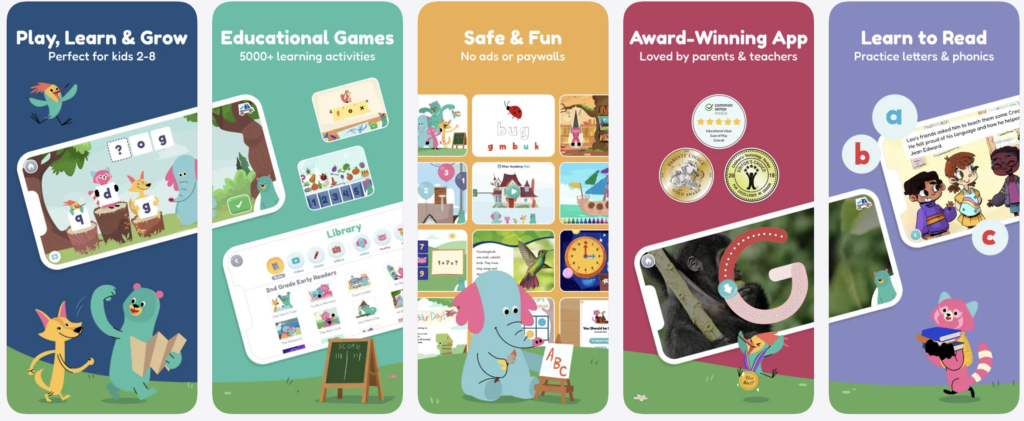
If there is one app worth downloading first, it is Khan Academy Kids. Built by a nonprofit with no ads and no hidden costs, it packs more than 4,000 learning activities — covering reading, phonics, math, executive functioning, and creative expression — into a single, beautifully designed app. It also includes an eBook library with over 400 fiction and non-fiction titles. It’s like carrying a library in your pocket.
Why it stands out:
- Curriculum depth. Activities align to Head Start Early Learning Outcomes Framework and Common Core State Standards, developed in collaboration with the Stanford Graduate School of Education.
- Personalized learning paths. The app adjusts automatically to each child’s age and performance, so a 3-year-old and a 7-year-old have genuinely different experiences.
- Lovable characters kids want to spend time with. Kodi the Bear, Ollo the Elephant, Reya the Red Panda, Peck the Hummingbird, and Sandy the Dingo guide children through activities with warmth and humor.
- Built for school and home. Free Teacher Tools enable teachers to create class codes, assign activities aligned with what students are learning at home, and track student progress. Parents get a separate progress view.
- 5-star Common Sense Media rating for both Educational Value and Ease of Play — higher than Duolingo ABC, PBS Kids, Reading Eggs, Starfall, Epic!, and ABCmouse. The app is also recognized as an “Editors Choice” in the Apple App Store.
- Offline access. Core features are available without a Wi-Fi connection.
Best for: Families and classrooms looking for a comprehensive, completely free, ad-free early learning tool.
2. PBS Kids Games
Ages: 2–8 | Cost: Free | Nonprofit: Yes | Common Sense Media: Recommended

PBS Kids Games is one of the most trusted names in early childhood media. Like Khan Academy, PBS is a nonprofit — meaning the app exists to serve children, not to monetize them. It brings beloved characters from Daniel Tiger, Curious George, Wild Kratts, and more into learning activities covering math, literacy, problem-solving, and science.
Why it stands out:
- Characters children already know make new content feel immediately familiar and safe.
- Covers a wide range of subjects across all early learning domains.
- Completely free, with no ads directed at children.
- Many activities are available offline, making it practical for travel or low-connectivity settings.
Best for: Children who are already PBS fans, and families who want variety across subjects in a single trusted app.
3. ScratchJr (PBS KIDS Edition)
Ages: 5–7 | Cost: Free | Common Sense Media: Recommended
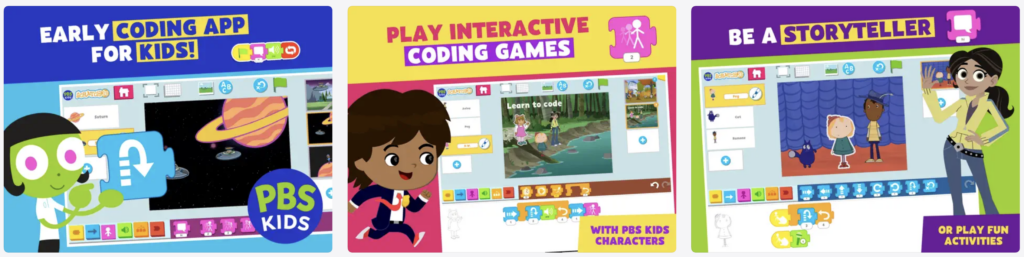
A collaboration between PBS Kids and MIT, ScratchJr is the gentlest on-ramp to coding available for young children. Kids drag and drop blocks of code to direct beloved PBS characters — making them move, speak, and tell stories. No reading required.
Why it stands out:
- Introduces real computational thinking concepts (sequencing, loops, triggers) in a format young children can genuinely engage with.
- Open-ended creative design: children make their own animated stories, not just follow a script.
- No personal information collected from children.
- Common Sense Education reviewers describe it as a strong, creative introduction to block programming for early elementary students.
One thing to know: There’s no step-by-step instruction, so younger children benefit from a bit of adult guidance to get started.
Best for: Kindergartners and 1st–2nd graders who are ready to explore creative problem-solving and early coding concepts.
4. Pok Pok
Ages: 2–7 | Cost: Subscription | Common Sense Media: Reviewed

Pok Pok takes a Montessori-inspired approach: no timers, no scores, no right answers. Children tap and swipe through a calm digital playroom filled with activities like music-making, drawing, cooking, and building. It is screen time designed to feel like play, not like a test.
Why it stands out:
- No ads, no in-app purchases, no manipulative reward loops — just open-ended exploration.
- Particularly well-suited for children who get overstimulated by flashy, fast-paced apps.
- Inclusive character design (varied skin tones, differently-abled characters, diverse family representations).
- Common Sense Media has reviewed and recommended it for ages 2–6.
One thing to know: Pok Pok is a paid subscription, making it the only app on this list that isn’t free or free-to-start. Many families find it worth it for the calm it brings; it’s worth trying the free trial first.
Best for: Toddlers and preschoolers who need unstructured digital play, and families who want a low-stimulation app they can feel good handing over.
5. Endless Alphabet
Ages: 2–7 | Cost: $8.99 one-time purchase | Common Sense Media: 5 Stars

Endless Alphabet turns vocabulary into a full sensory experience. Animated monsters act out each word in hilariously exaggerated scenes while kids drag letters into place to spell them out. The result is phonics and vocabulary practice that children ask to come back to.
Why it stands out:
- Strong offline functionality — no internet required once downloaded.
- One of the few early literacy apps that earns high engagement without timers, pressure, or badges.
- Common Sense Media gives it a 5-star rating; frequently endorsed by early childhood teachers for phonics readiness.
- Clean, focused design with no advertising.
Best for: PreK and kindergarten learners building phonics awareness and early vocabulary in a playful, low-pressure format.
6. Duolingo ABC
Ages: 3–7 | Cost: Free | Common Sense Media: Recommended
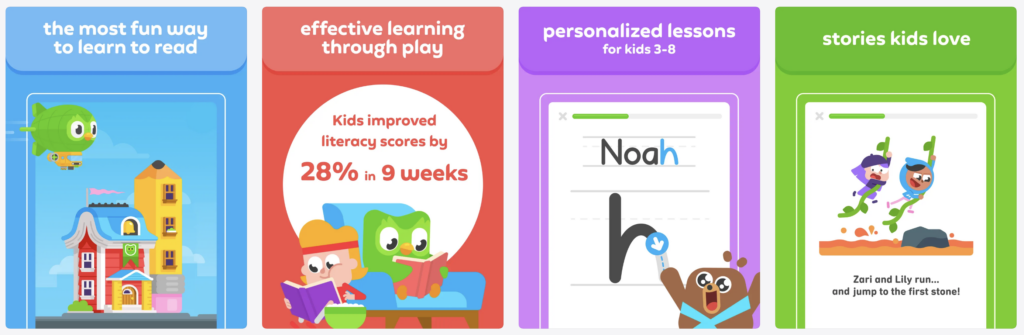
Duolingo ABC takes the step-by-step approach that made Duolingo famous for language learning and applies it to early reading. Children work through letter recognition, phonics, and foundational concepts through mini-games involving tapping, tracing, listening, and speaking aloud.
Why it stands out:
- Logical, sequential learning path means children build skills in the right order.
- Incorporates speech recognition so children practice saying sounds, not just recognizing them visually.
- Completely free, no ads.
- Common Sense Media notes the structured approach works well for children who benefit from a clear, predictable progression.
One thing to know: The path is linear, so children with some reading skills may move through early levels quickly. Works best as a starting point or reinforcement tool rather than a standalone reading curriculum.
Best for: Children just beginning to learn letters and letter sounds who thrive with structured, step-by-step formats.
7. SplashLearn
Ages: 3–10 | Cost: Free to start; subscription for full curriculum | Common Sense Media: Recommended

SplashLearn is a curriculum-aligned math and early reading app that adapts to each child’s level. Teachers consistently praise it in Common Sense Education reviews for classroom engagement, and the parent dashboard provides real visibility into progress.
Why it stands out:
- Covers math and ELA from pre-K through Grade 5, making it useful well beyond the early years.
- Adjusts to individual skill levels so children are challenged but not frustrated.
- A parent/teacher dashboard tracks progress and skill completion.
One thing to know: Full curriculum access requires a subscription. The free version offers a meaningful starting point.
Best for: Families and teachers looking for a structured, standards-aligned math and early reading tool that grows with the child.
8. Bedtime Math
Ages: 3–9 | Cost: Free | Common Sense Media: Reviewed
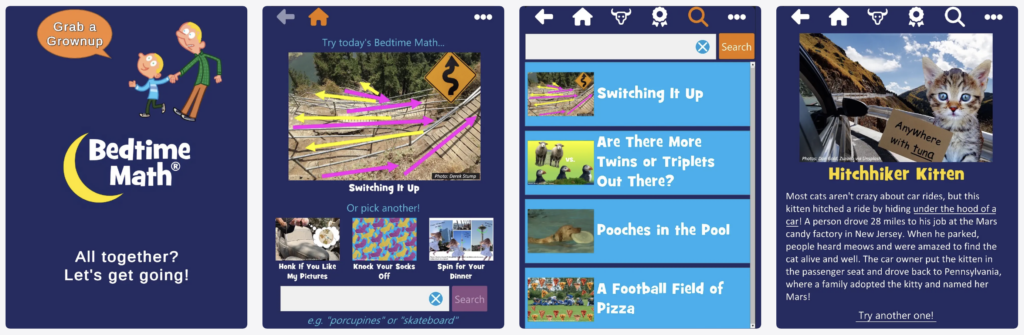
Bedtime Math flips the script on math anxiety by making it a daily ritual — like reading a bedtime story, but with numbers. Each day brings a new real-world fun fact and a set of word problems at three levels: “Wee Ones,” “Little Kids,” and “Big Kids.”
Why it stands out:
- Designed for parents and children to do together, building the habit that math is a normal, enjoyable part of life — not something scary.
- Daily problems range from simple counting to more complex thinking, so the whole family can participate at once.
- Completely free, no ads.
- Common Sense Media notes it’s a nice, simple tool for building everyday math habits.
One thing to know: Bedtime Math is a parent-child ritual app, not a standalone practice tool for independent use. It works best when an adult is involved.
Best for: Families who want to build a daily math habit at home, especially children who are anxious about numbers and need to see math as fun and low-stakes.
9. Moose Math (by Khan Academy)
Ages: 3–7 | Cost: Free | Common Sense Media: Recommended
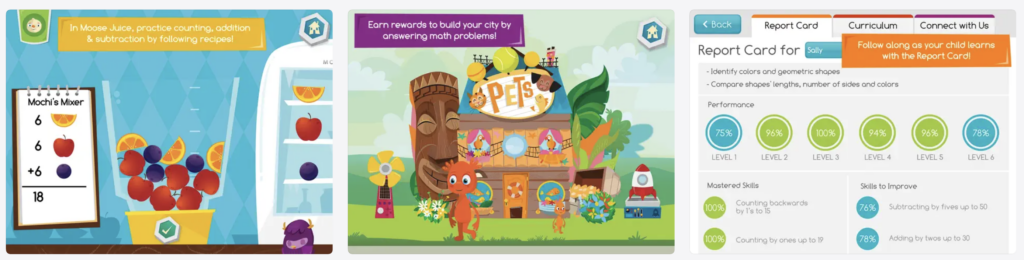
Created by Duck Duck Moose and now part of Khan Academy, Moose Math makes early math concepts concrete through five adventure-style activities covering counting, addition, subtraction, shapes, and sorting. The carnival-and-town setting gives children a sense of place as they work through math at their own pace.
Why it stands out:
- Completely free, no ads, no in-app purchases.
- Offline-capable.
- Visual, story-driven format helps young learners who benefit from math in context rather than isolated drills.
- Frequently cited by early childhood teachers to use alongside Khan Academy Kids.
Best for: PreK and kindergarten children just beginning to work with numbers who need math to feel concrete and connected to a real (if fantastical) world.
Quick Comparison at a Glance
| App | Ages | Cost | Offline | Best For |
|---|---|---|---|---|
| Khan Academy Kids | 2–8 | Free | Yes | Full curriculum, classroom + home |
| PBS Kids Games | 2–8 | Free | Partial | Multi-subject, familiar characters |
| ScratchJr | 5–7 | Free | Yes | Early coding and creative thinking |
| Pok Pok | 2–7 | Subscription | Yes | Calm, open-ended Montessori play |
| Endless Alphabet | 2–7 | Free/Paid | Yes | Phonics and vocabulary |
| Duolingo ABC | 3–7 | Free | Limited | Beginning letter sounds and phonics |
| SplashLearn | 3–10 | Free/Sub | Limited | Math + ELA, grows with the child |
| Bedtime Math | 3–9 | Free | Yes | Daily math ritual with parents |
| Moose Math | 3–7 | Free | Yes | Early math in story format |
A Note on Screen Time
Every app on this list represents quality screen time — interactive, skill-building, and free from ads and manipulative design. That said, not all screen time is equal, and the how matters as much as the what.
The American Academy of Pediatrics’ latest guidance moves beyond asking “how many minutes?” to a bigger question: what kind of digital environment are children growing up in? Apps that are ad-free, open-ended, and designed to support rather than exploit young learners are exactly what that guidance points toward.
Want to go deeper? Our guide to healthy screen time for young children covers what helps, what hurts, and practical tips for both families and classrooms.
Start Here
If you’re only downloading one app today, make it Khan Academy Kids. It’s free, comprehensive, and built by a nonprofit committed to making a world-class education accessible to every child. Whether you’re a parent looking for meaningful screen time or a teacher searching for a classroom tool that works from day one, it is the place to start.